Kubernetes & Cloud Native Essentials (LFS250)
The Story Behind This Certification
I spent weeks inside this course asking myself one question over and over: "Why do we even need all of this?"
Not in a frustrated way. In a genuine, engineering way.
The answer, I found, is always the same: scale breaks everything. Running one app on one server is easy. Running 200 microservices across 50 nodes, keeping them healthy, routing traffic between them, persisting their data, shipping new versions without downtime -- that's where the whole cloud native ecosystem was born.
This certification walks you from the very beginning -- what even is cloud native? -- all the way to Kubernetes internals, application delivery with GitOps, and observability at scale. It is the most complete mental map I've built for this space.
Here is everything I learned, written the way I wish I had read it.
Chapter 1 -- Cloud Native Architecture
The Problem It Solves
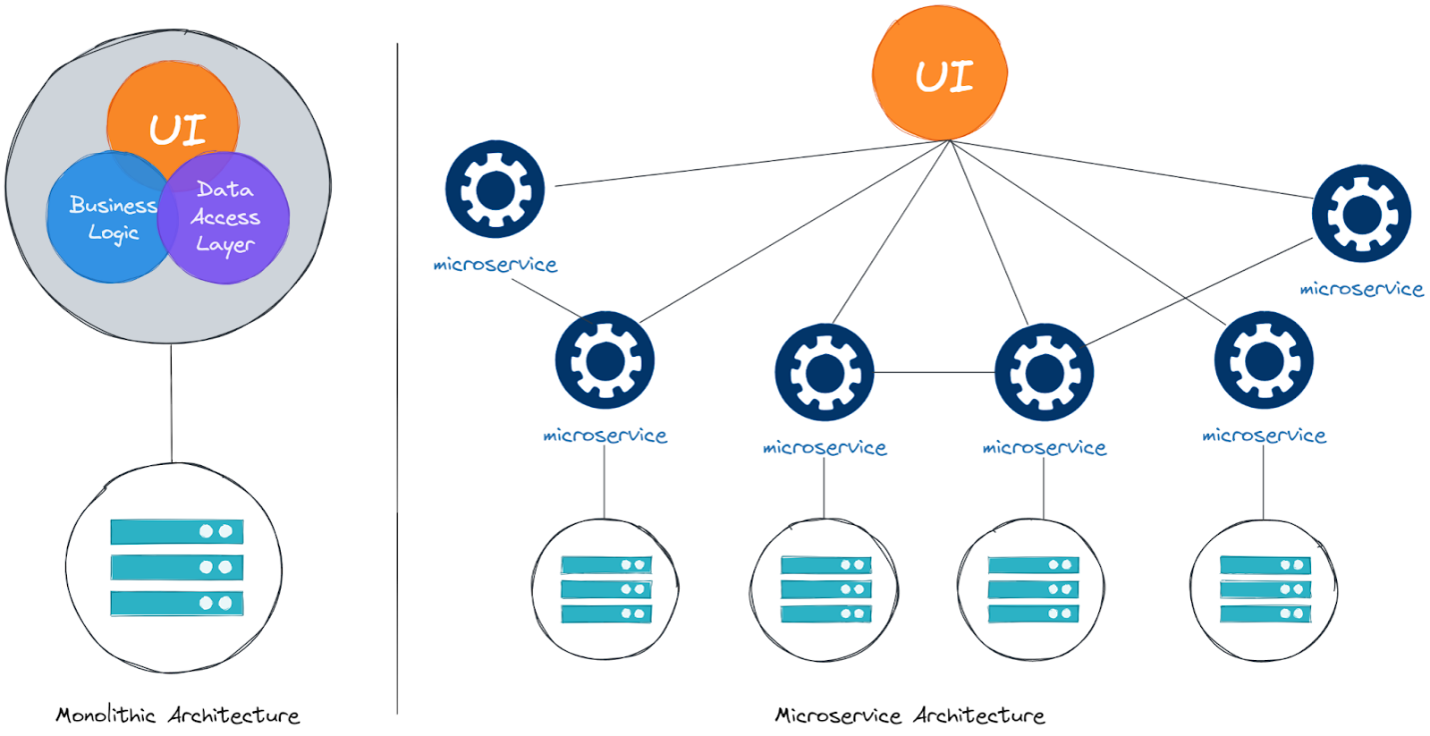
Traditional applications are designed with a monolithic approach -- a single codebase, delivered as a single binary, running on one server. Think of an e-commerce app where the UI, product listing, checkout, and order processing all live in the same place.
It is easy to start with a monolith, but challenging to manage complexity at scale, ship changes quickly, and scale specific parts under load.
Cloud native architecture addresses this by breaking applications into smaller, decoupled pieces that communicate over a network. These small, independent applications with a clearly defined scope are called microservices. Each one can be owned by a different team, deployed independently, and scaled on its own.
Mental model: Monolith = one big machine. Microservices = a team of specialists.
The CNCF Definition
The Cloud Native Computing Foundation defines cloud native as: practices that empower organizations to develop, build, and deploy workloads in any computing environment at scale, in a programmatic and repeatable manner. It is characterized by loosely coupled systems that are secure, resilient, manageable, sustainable, and observable.
Cloud native technologies typically consist of some combination of: containers, service meshes, microservices, immutable infrastructure, serverless, and declarative APIs.
Key Characteristics
| Characteristic | What it means |
|---|---|
| High automation | CI/CD pipelines, git-backed builds, minimal human steps |
| Self-healing | Health checks restart failing containers automatically |
| Scalable | Spin up more copies under load, scale down when quiet |
| Cost-efficient | Pay for what you use; Kubernetes packs workloads densely |
| Easy to maintain | Microservices are small, testable, independently deployable |
| Secure by default | Zero-trust model -- every process must authenticate |
A good baseline for cloud native is the Twelve-Factor App -- a set of guidelines covering version control, environment-aware config, statelessness, and application concurrency.
Autoscaling
The autoscaling pattern describes dynamic adjustment of resources in response to current demand. CPU and memory are the obvious metrics, but time-based or business-based metrics can also trigger scaling.
Two dimensions:
Horizontal scaling -- spawning new compute resources: new copies of your application, new virtual machines. This is what Kubernetes primarily does.
Vertical scaling -- changing the size of the underlying hardware: more CPU, more RAM. Works within hardware limits.
The analogy that sticks: Imagine carrying a heavy object you cannot lift. You can build muscle to carry it yourself -- that's vertical. Or you can call friends to share the load -- that's horizontal.
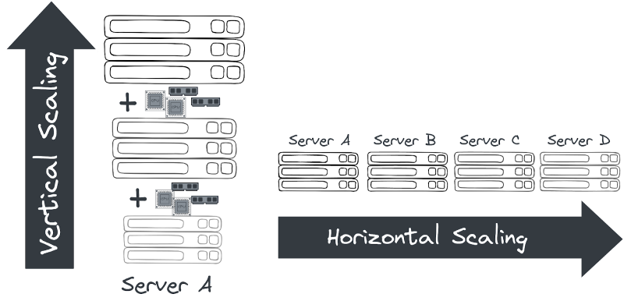
Configuring autoscaling requires specifying minimum and maximum instance counts and a metric that triggers scaling. Cloud environments with usage-based pricing are ideal -- you can even scale to zero when resources are not needed.
Serverless
Serverless doesn't mean no servers -- it means developers don't manage them. Normally, running a web app requires configuring networks, VMs, operating systems, and load balancers. Serverless removes that: you provide the code, the cloud chooses the environment.
All major cloud vendors offer Function as a Service (FaaS) -- developers deploy software by uploading code as zip files or container images. The platform handles everything else.
Autoscaling is core to serverless -- it scales based on events like incoming requests. This allows precise billing per event rather than by time.
To standardize event data across vendors, the CloudEvents project provides a specification for structuring event data. CloudEvents is a graduated project under the CNCF.
Open Standards
Many cloud native technologies rely heavily on open source software, preventing vendor lock-in. Key standards to know:
| Standard | Purpose |
|---|---|
| OCI Spec | How to build, run, and distribute containers |
| CNI | How to implement networking for containers |
| CRI | How to implement container runtimes in orchestration systems |
| CSI | How to implement storage in orchestration systems |
| SMI | How to implement Service Meshes in Kubernetes |
Systems like Prometheus and OpenTelemetry also evolved in this ecosystem, providing additional standards for monitoring and observability.
Cloud Native Roles
| Role | Core responsibility |
|---|---|
| Cloud Architect | Designs application landscape and infrastructure |
| DevOps Engineer | Balances software development and operations through tools and processes |
| Security Engineer | Secures cloud environments and handles new attack vectors |
| DevSecOps Engineer | Combines dev, ops, and security into one integrated role |
| Data Engineer | Collects, stores, and analyzes vast data from large systems |
| Full-Stack Developer | Frontend, backend, and infrastructure essentials |
| Site Reliability Engineer (SRE) | Creates and maintains software that is reliable and scalable |
SRE -- The Role Worth Remembering
The SRE (Site Reliability Engineer) role was founded around 2003 at Google. The overarching goal is to create and maintain reliable and scalable software using software engineering approaches to solve operational problems.
SREs use three key metrics:
| Metric | Definition | Example |
|---|---|---|
| SLO (Service Level Objective) | A target reliability level | Latency under 100ms |
| SLI (Service Level Indicator) | The actual measured value | How long a request actually takes |
| SLA (Service Level Agreement) | The contract with users about missed SLOs | Financial penalty if 99.9% uptime is not met |
Around these, SREs define an error budget -- the allowed number of errors before action is taken, such as stopping deployments to production. If you've used up your budget, you stop shipping and fix stability instead.
CNCF Graduation Stages
Many open source projects considered industry standards are hosted and supported by the CNCF. Projects go through maturity stages:
| Stage | What it means |
|---|---|
| Sandbox | Early-stage, promising potential, experimental |
| Incubating | Production-ready, sustained community, used by 3+ independent organizations |
| Graduated | Widespread adoption, long-term sustainability, exemplary governance |
A project needs a two-thirds supermajority vote from the Technical Oversight Committee (TOC) to advance stages. Kubernetes itself is a graduated project.
Chapter 2 -- Container Orchestration
Why Containers Exist
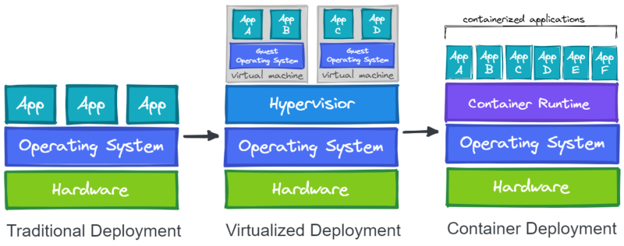
Setting up a server to run an application is tedious: install the OS, install Python, install dependencies, configure networking, connect to databases. Doing this across many servers is error-prone and hard to maintain.
Virtual machines helped by allowing multiple isolated environments on one physical server, but each VM runs its own full OS -- significant overhead when you need to scale hundreds of instances.
Containers solve this: they package applications with their dependencies while sharing the host system's kernel. Lighter, faster, and more efficient than full VMs.
Container Basics -- What's Actually Happening
Container technology is older than most think. One of its earliest predecessors was the chroot command in Unix 1979 -- it isolated a process from the main filesystem by creating a restricted environment.
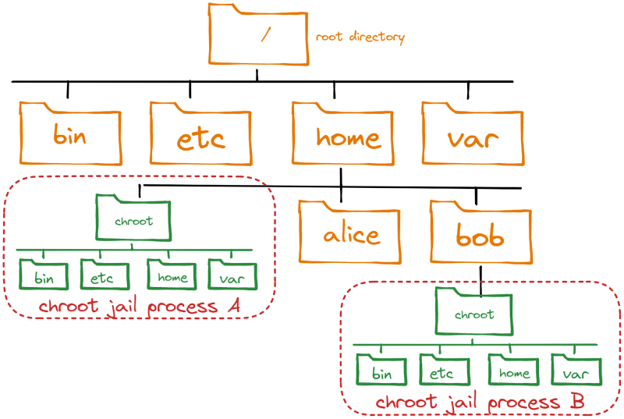
Modern containers use two Linux kernel features:
Namespaces isolate resources. A network namespace gives a process its own IP address, separate from the host.
cgroups (control groups) organize processes and assign them resource limits -- CPU, memory. When you limit a container to 4GB RAM, cgroups enforce that limit.
The 8 Linux namespaces:
| Namespace | Isolates |
|---|---|
pid | Process IDs |
net | Network stack, IP address |
mnt | Filesystem mount points |
ipc | Inter-process communication |
user | User and group IDs |
uts | Hostname and domain name |
cgroup | cgroup root directories |
time | System clock (newest) |
Launched in 2013, Docker became synonymous with containerization. It didn't invent namespaces or cgroups -- it stitched existing technologies together with a great developer experience.
Key difference from VMs: VMs emulate a complete machine including the OS and kernel. Containers share the host kernel and are only isolated processes. Containers start in milliseconds.
Building Container Images
Docker's breakthrough was container images -- they make containers portable and easy to reuse across any system.
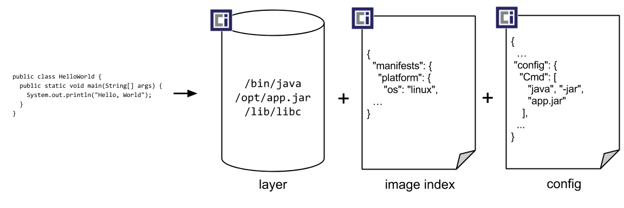
Images are built from instructions in a Dockerfile:
# Start from a base image
FROM ubuntu:24.04

# Install dependencies
RUN apt-get update && apt-get -y install python3 python3-pip

# Copy your code
COPY my-app.py /app/

# Set working directory
WORKDIR /app

# Define the startup command
CMD ["python3", "my-app.py"]
# Build the image
docker build -t my-python-image -f Dockerfile

# Push to a registry
docker push my-registry.com/my-python-image

# Pull from a registry
docker pull my-registry.com/my-python-image
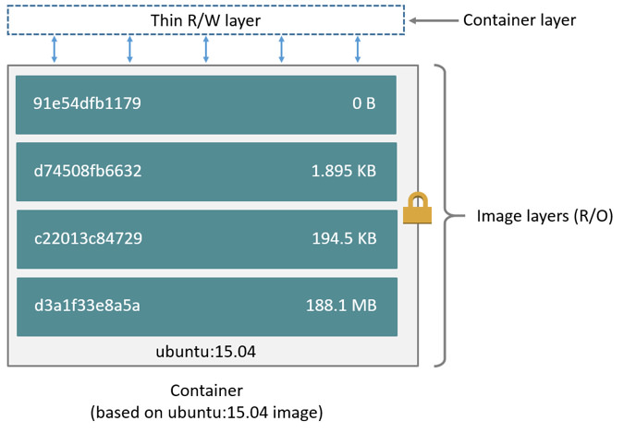
Images consist of read-only layers. Each Dockerfile instruction creates a new layer. When you start a container, a thin read-write layer is added on top. When the container stops, that layer disappears -- this is why containers are ephemeral.
Container Security
When containers run on a host, they all share the same OS kernel. This shared kernel can be dangerous if containers are granted excessive permissions -- like executing kernel-level functions or altering host network settings.
One of the most serious risks is running containers as root. Many containers in production still do this, increasing their vulnerability.
Public images also pose risks. Always verify images from Docker Hub or Quay have not been tampered with before using them.
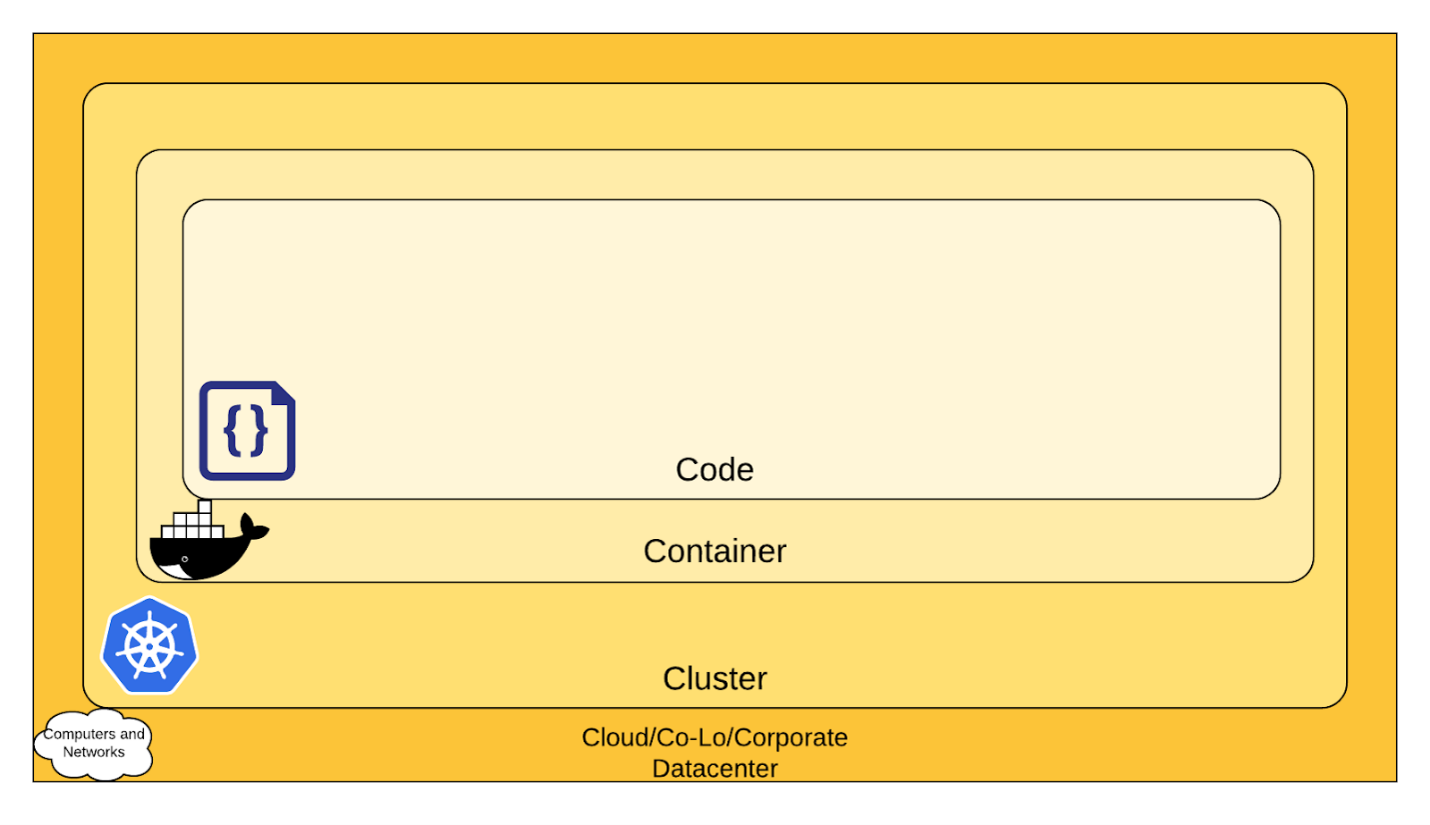
The 4C's of Cloud Native Security -- each layer strengthens the protection of those within it:
Container Orchestration
Running a few containers on one server is simple. Running hundreds across many servers introduces hard problems:
- Providing compute resources where containers can run
- Scheduling containers to servers efficiently
- Allocating CPU and memory
- Replacing containers that fail
- Scaling under load
- Providing networking between containers
- Provisioning persistent storage
Container orchestration systems solve all of this. They create a cluster of servers and run containers across them efficiently. Two main components: a control plane (manages the cluster) and worker nodes (run the containers).
Today, Kubernetes is the industry standard for container orchestration.
Networking in Orchestration
Network namespaces give each container its own IP address -- multiple containers can use the same port without conflicts. Containers can also map internal ports to host ports, making applications accessible externally.
For communication between containers on different hosts, an overlay network is used -- a virtual network spanning multiple hosts for seamless container-to-container communication.
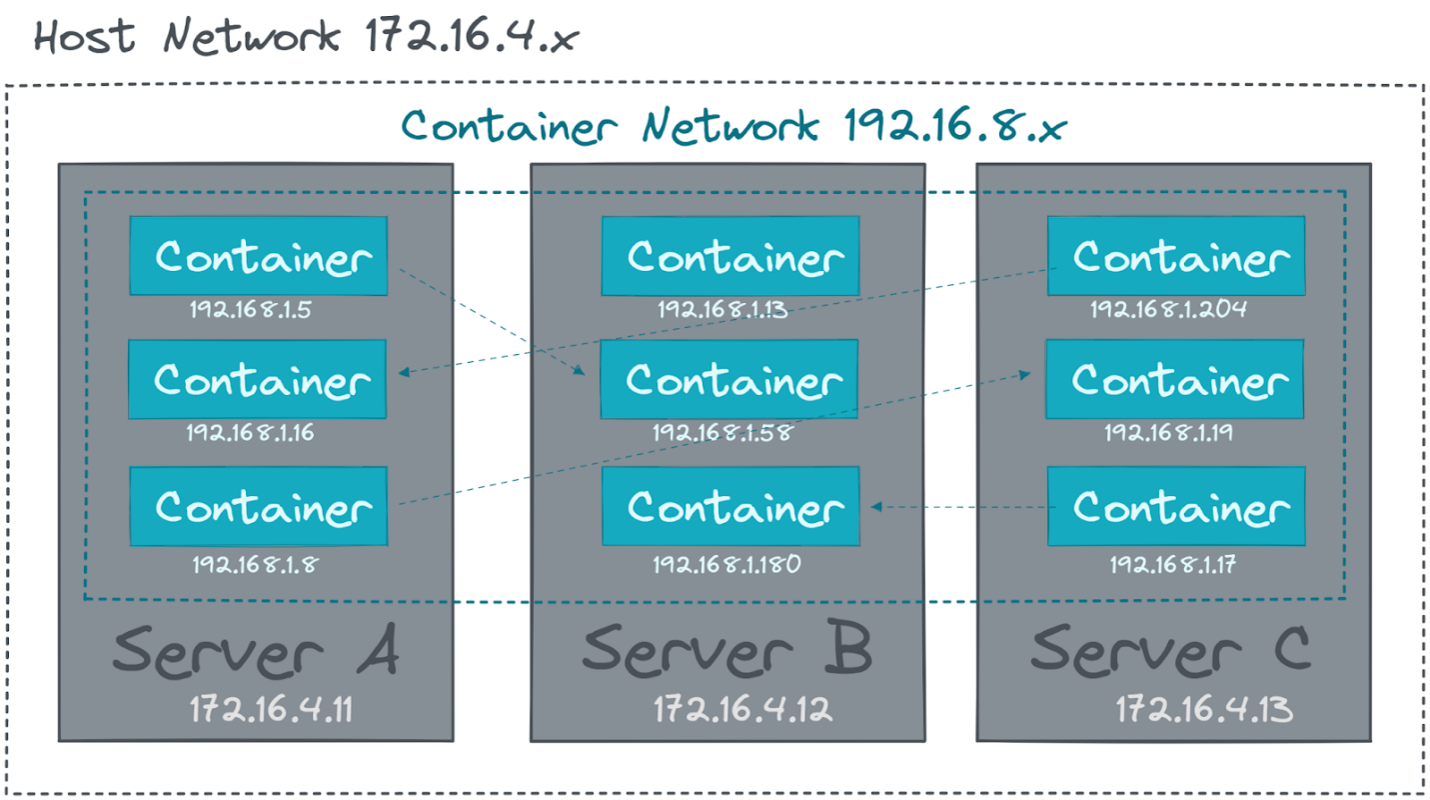
The solution to dynamic container communication is a Service Registry -- a system that automatically tracks running services. This enables Service Discovery, allowing containers to find each other without manual configuration.
Most modern container networking systems use the Container Network Interface (CNI) -- a standard for how network plugins connect containers.
Service Mesh
Networking in microservices can quickly become complex. Beyond connecting containers, teams need monitoring, access control, and encryption for secure service-to-service communication.
Instead of building these capabilities into every application, a service mesh automatically deploys a lightweight proxy alongside every container. These proxies handle all network communication, abstracting complexity away from application code.
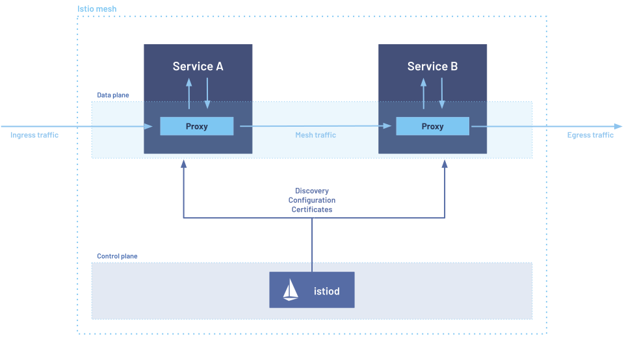
- The data plane = the proxies -- enforce traffic policies
- The control plane = centrally manages and distributes rules
Popular service meshes: Istio and Linkerd.
For encryption between services, instead of every app managing its own certificates and key rotation, the proxies handle encryption and identity verification transparently.
Storage
From a storage perspective, containers have a significant flaw: they are ephemeral.
Container images are read-only. When you start a container, a read-write layer is placed on top. When the container stops or is removed -- that layer disappears. Data is lost. Like RAM being cleared on shutdown.
To preserve data beyond the container lifecycle, it must be written to persistent storage.
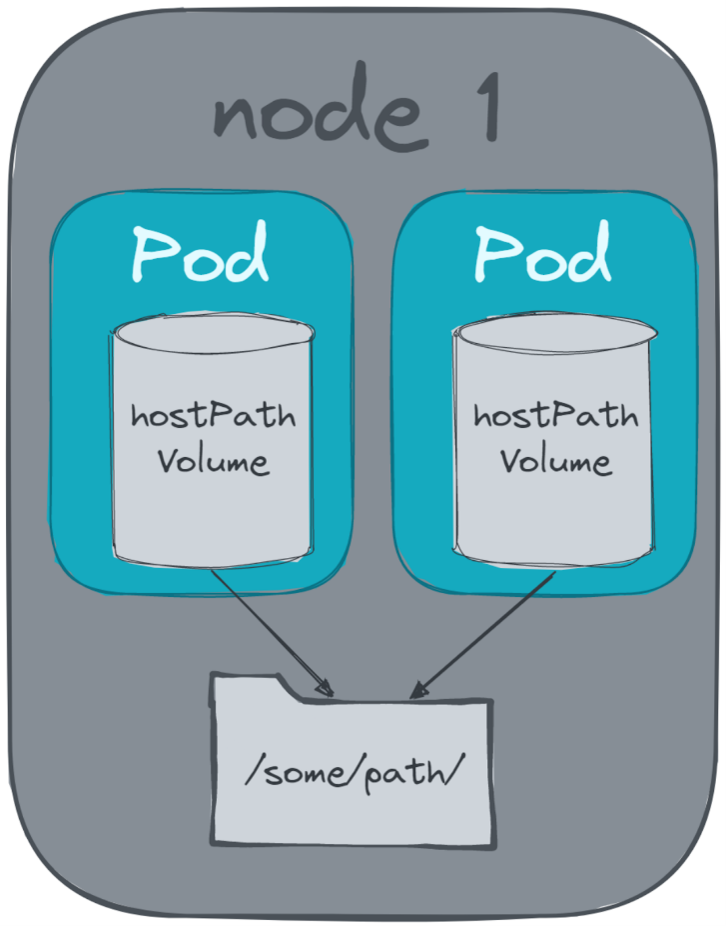
This is where volumes come in. Instead of isolating the entire filesystem, specific directories from the host are mounted directly into the container.
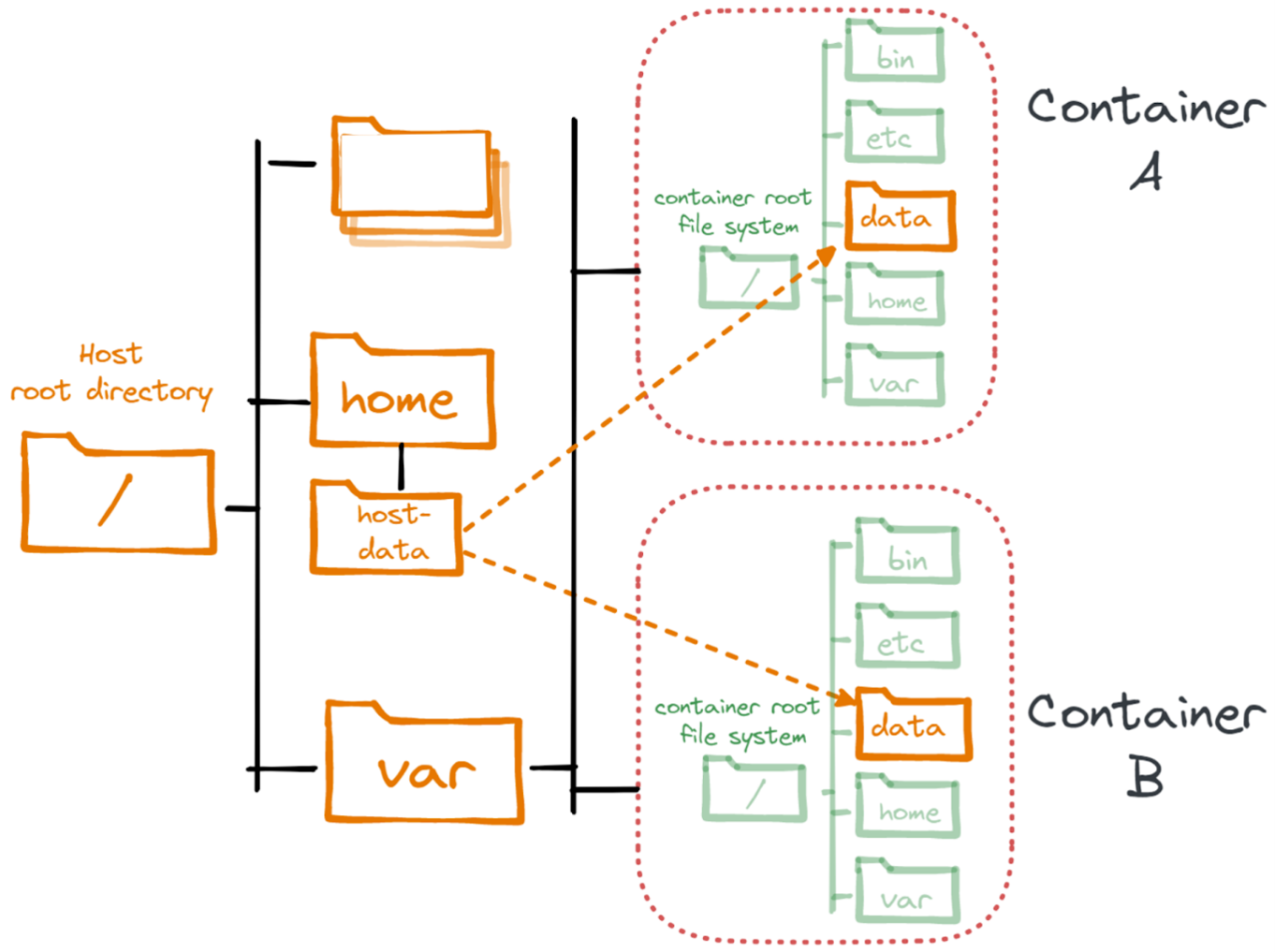
When containers move across hosts or need to share data across nodes, local volumes are insufficient.
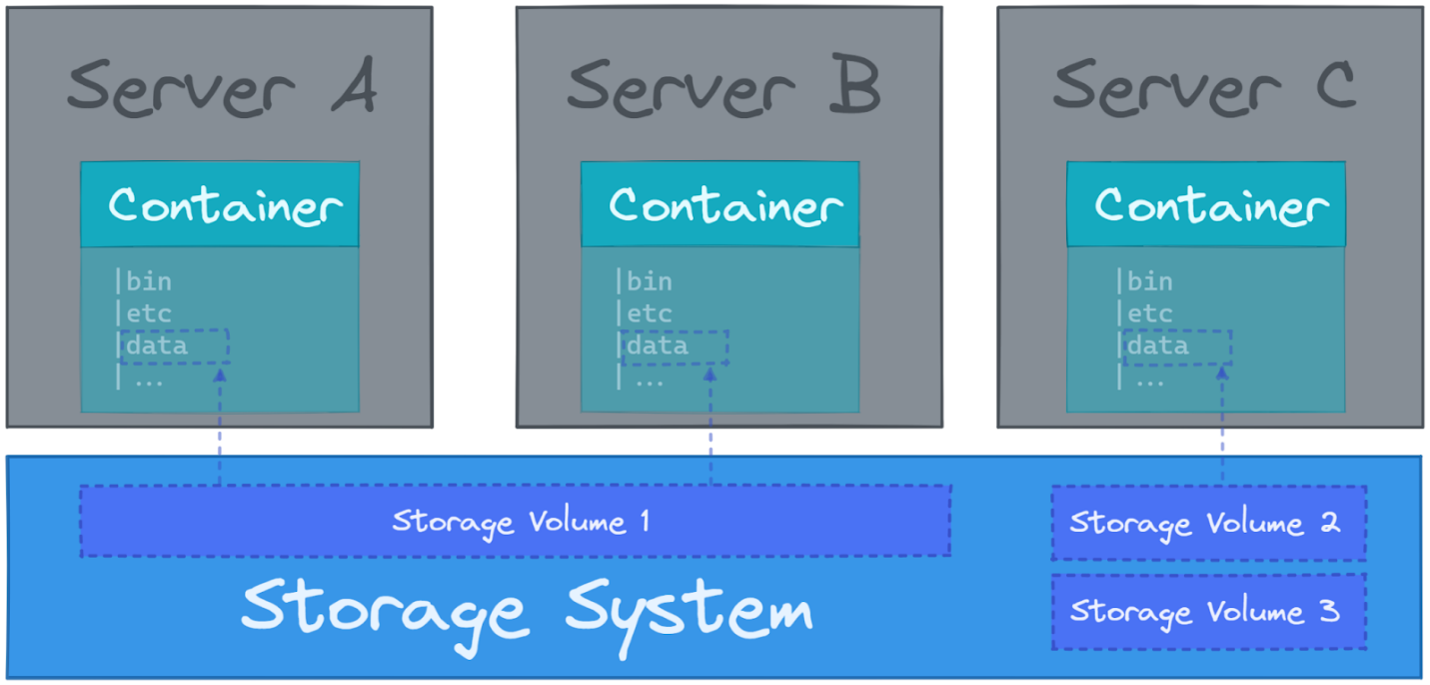
The Container Storage Interface (CSI) provides a consistent, vendor-neutral way for orchestration systems to work with any storage backend.
Chapter 3 -- Kubernetes Fundamentals
What Is Kubernetes?
Kubernetes is one of the most widely used open source platforms for orchestrating containers. It automates the deployment, scaling, and management of containerized applications.
Originally developed at Google and open-sourced in 2014, Kubernetes became the first project donated to the CNCF. Since then, the entire cloud-native ecosystem -- container runtimes, monitoring tools, delivery platforms -- has grown around it.
Because Kubernetes plays a central role in modern cloud platforms, professionals with Kubernetes skills are in high demand.
Cluster Architecture
Kubernetes is deployed as a cluster running across multiple servers. Thanks to strong horizontal scalability, it can support thousands of nodes spread across data centers and regions.
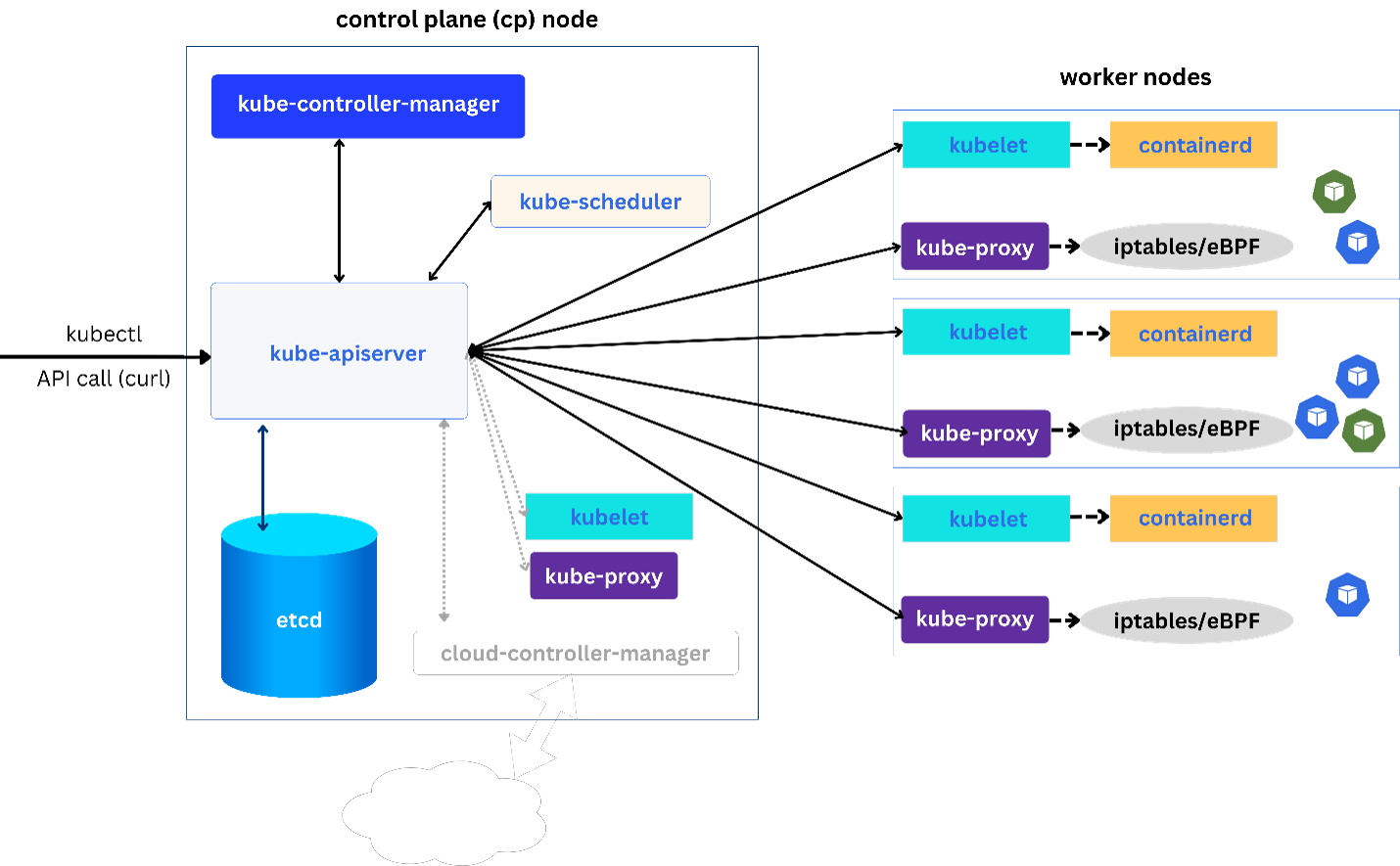
Two node types:
Control plane nodes act as the "brains" -- they run components that manage scheduling, deployments, and self-healing behaviors.
Worker nodes run applications. They follow instructions from the control plane, such as when to start or stop containers.
Control Plane Components
| Component | Purpose |
|---|---|
kube-apiserver | Entry point for all commands -- central communication hub -- nothing passes without it |
etcd | Distributed key-value store -- single source of truth for all cluster state |
kube-scheduler | Decides which worker node to run each Pod on |
kube-controller-manager | Runs controllers that maintain desired state |
cloud-controller-manager | Integrates with cloud provider APIs (optional) |
kube-apiserver -- The gatekeeper. Every create, read, update, delete operation flows through it. Handles RESTful API requests over HTTPS (port 6443 by default). Every request goes through: Authentication -> Authorization -> Admission Control.
etcd -- The brain's memory. Records and maintains the complete desired and observed state of the cluster. The kube-apiserver is the ONLY component that directly communicates with etcd. If etcd is lost, cluster state is lost -- always back it up.
kube-scheduler -- The placement engine. Watches newly created Pods without an assigned node. Two phases:
- Filtering -- eliminates nodes that cannot accommodate the Pod (insufficient resources, taints, affinity rules)
- Scoring -- ranks remaining nodes based on resource utilization, data locality, topology spread
kube-controller-manager -- The self-healer. Runs a collection of controllers, each watching specific resources. If a Deployment specifies 3 replicas but only 2 are running, the ReplicaSet controller creates a new Pod. Control loop: observe -> compare -> act.
Worker Node Components
| Component | Purpose |
|---|---|
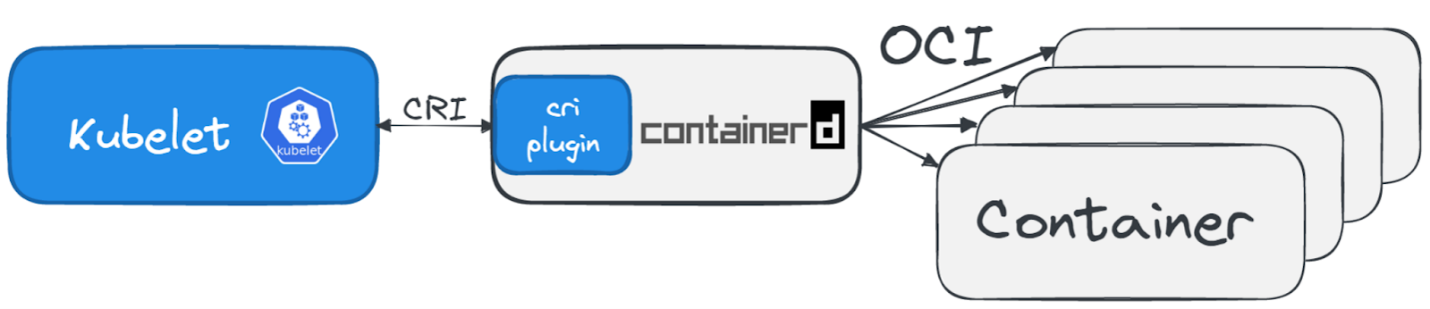
| Container runtime | Runs containers (containerd, CRI-O) |
| kubelet | Agent on each node -- ensures containers run per PodSpec |
| kube-proxy | Routes network traffic between Services and Pods |
kubelet -- The on-site manager. Receives PodSpecs (blueprints for which containers to run) and ensures those containers are up and healthy. If Kubernetes were a construction site, the control plane would be the architect and the kubelet would be the foreman.
kube-proxy -- The traffic controller. Runs on every worker node, responsible for routing network traffic between Services and Pods. Acts as a simple load balancer using iptables/ipvs/nftables under the hood.
An important design aspect: workloads already running on a worker node continue even if the control plane becomes unavailable. However, scheduling new workloads or scaling cannot happen while the control plane is offline.
Kubernetes API
The Kubernetes API is the central component of a Kubernetes cluster. Every user, tool, and internal component relies on the API server to interact with and manage the system.
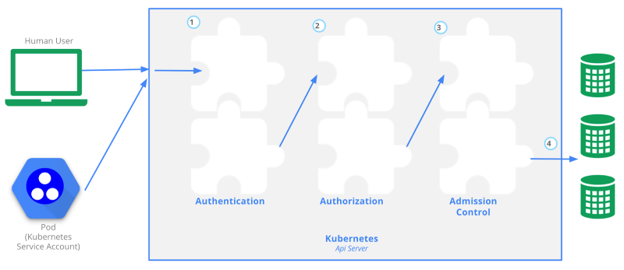
Before Kubernetes processes a request, it must pass through three key stages:
Authentication -- proves identity. Uses X.509 certificates or external identity systems. Kubernetes provides Service Accounts for workload authentication.
Authorization (RBAC) -- determines what the authenticated identity can do.
Admission Control -- final stage before a request is accepted. Controllers can validate, modify, or reject requests.
Kubernetes Namespaces
Kubernetes namespaces (different from Linux kernel namespaces) allow you to organize a cluster into logical groups for multi-tenancy. Think of them like directories on a computer -- they help organize resources and control access. They are not strong isolation.
Kubernetes Setup Options
# Local testing
Minikube | kind | MicroK8s

# Production self-hosted
kubeadm | kops | kubespray

# Distributions with commercial support
Rancher | k3s | Red Hat OpenShift | VMWare Tanzu

# Managed cloud
AWS EKS | Google GKE | Microsoft AKS | DigitalOcean DOKS
Chapter 4 -- Working With Kubernetes
Kubernetes Objects
Kubernetes represents system behavior through objects -- abstract resources that define how workloads should run. Some focus on scheduling, scaling, and self-healing. Others address configuration, networking, and security.
Users define objects using YAML and submit them to the Kubernetes API server.
Every object requires four fields:
| Field | Purpose |
|---|---|
apiVersion | Which version of the object schema to use |
kind | Type of Kubernetes object |
metadata | Identifying information, including name |
spec | Desired state of the object |
apiVersion: apps/v1
kind: Deployment
metadata:
  name: nginx-deployment
spec:
  replicas: 2
  selector:
    matchLabels:
      app: nginx
  template:
    metadata:
      labels:
        app: nginx
    spec:
      containers:
        - name: nginx
          image: nginx:1.29
          ports:
            - containerPort: 80
Creating an object expresses intent -- you declare the state you want, not manually start containers. Kubernetes reconciles the system to match what you've defined.
Interacting with Kubernetes
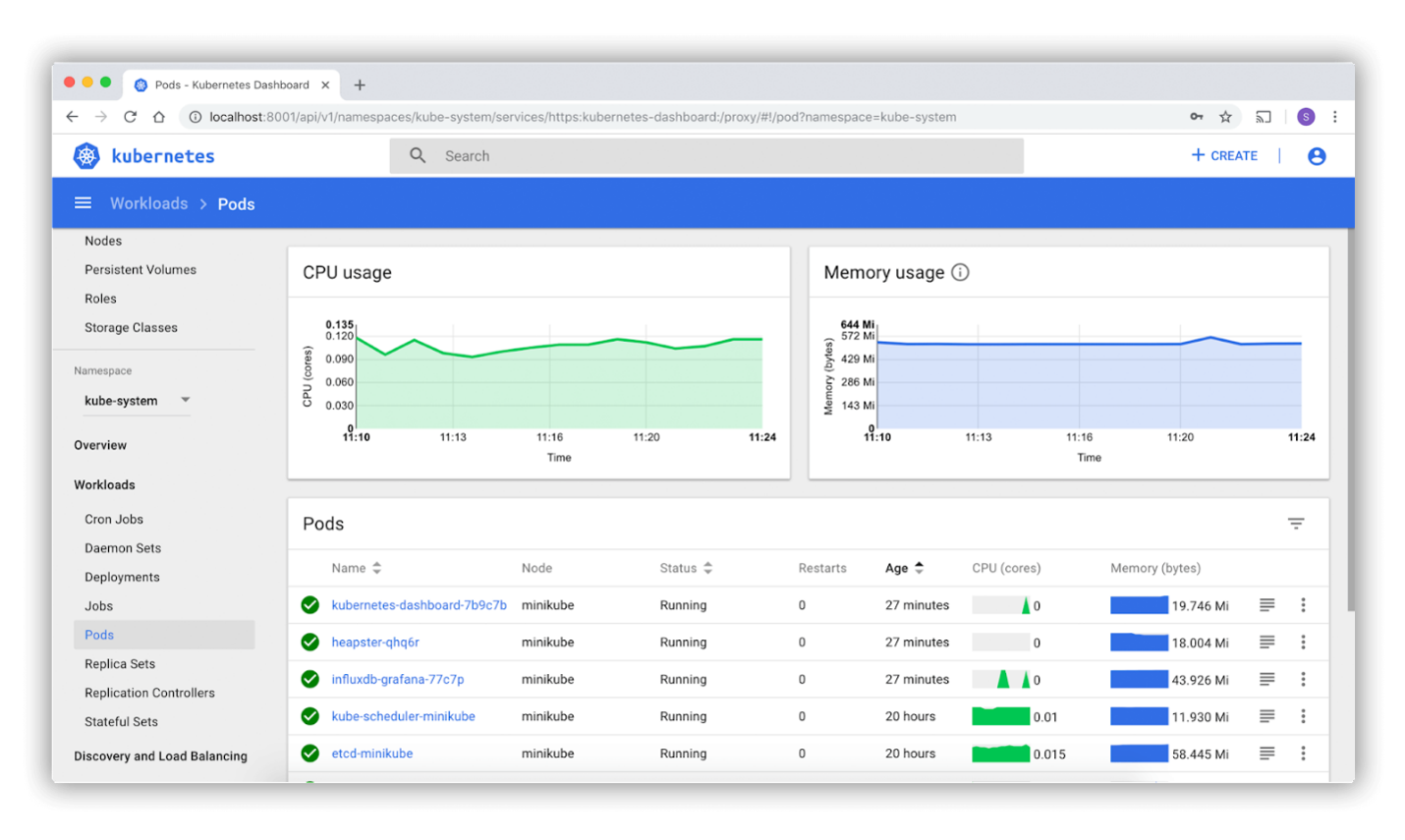
To interact with the Kubernetes API, you use the official command-line tool, kubectl.
# List all available resource types
kubectl api-resources

# Get documentation for a resource
kubectl explain pod
kubectl explain pod.spec

# Core operations
kubectl get pods/deployments/services -n namespace
kubectl get pods -o wide
kubectl describe pod <name>
kubectl logs <pod> -f
kubectl logs <pod> --previous
kubectl exec -it <pod> -- bash

# Apply / delete
kubectl apply -f manifest.yaml
kubectl delete -f manifest.yaml

# Rollout management
kubectl rollout status deployment/myapp
kubectl rollout history deployment/myapp
kubectl rollout undo deployment/myapp

# Port forward for debugging
kubectl port-forward svc/myapp 8080:8080

# Scaling
kubectl scale deployment myapp --replicas=5
Helm is the package manager for Kubernetes. It packages collections of objects into Charts -- versioned, reusable, shareable units.
helm repo add bitnami https://charts.bitnami.com/bitnami
helm install my-postgres bitnami/postgresql
helm upgrade my-postgres bitnami/postgresql --set replicaCount=2
helm uninstall my-postgres
Pod Concept
The most fundamental object is the Pod. A pod wraps one or more containers that share the same network namespace, storage volumes, and lifecycle.
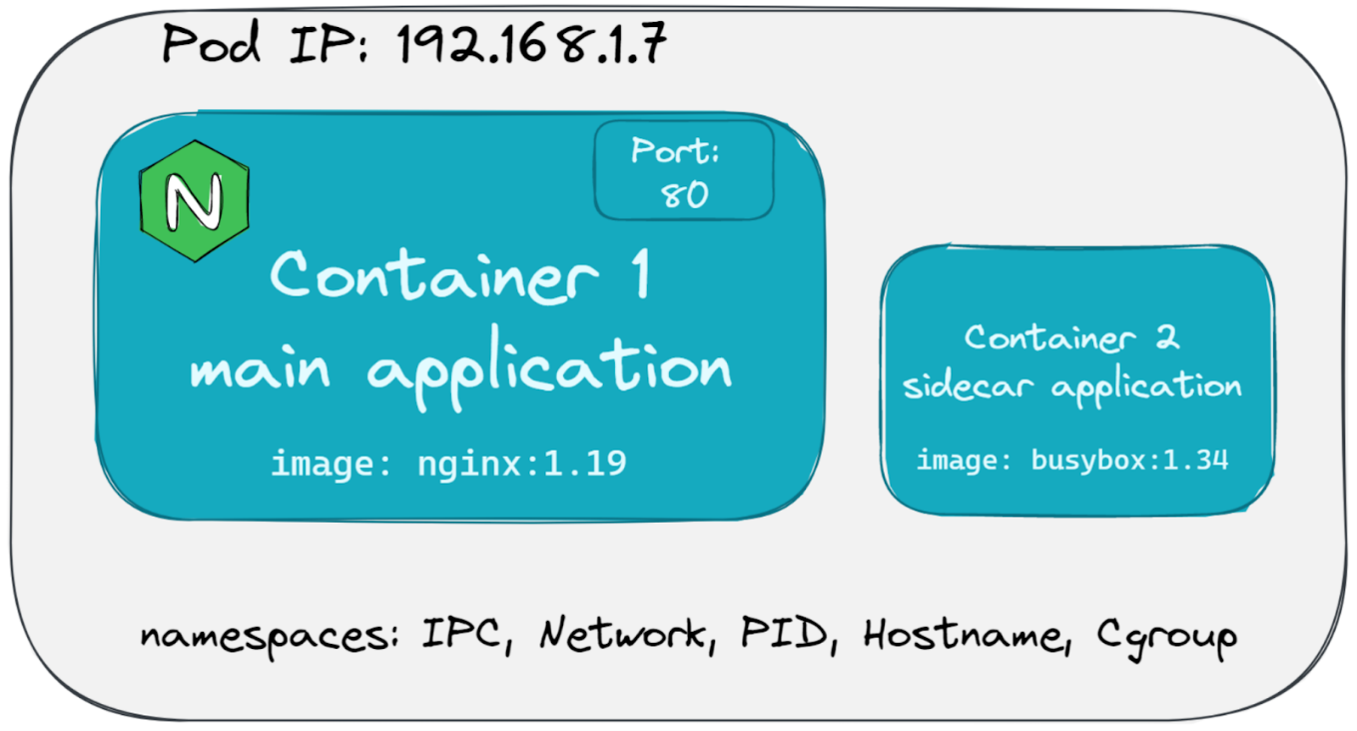
Kubernetes never interacts with containers directly -- always through pods.
apiVersion: v1
kind: Pod
metadata:
  name: nginx-with-sidecar
spec:
  containers:
    - name: nginx           # main container
      image: nginx:1.29
      ports:
        - containerPort: 80
    - name: log-collector   # sidecar container
      image: busybox:1.34
      args: [/bin/sh, -c, 'while true; do echo "$(date)"; sleep 1; done']
Multiple containers in a pod cannot be scaled independently -- the pod scales as a unit. When an additional container provides supporting functionality, it is a sidecar container.
Use initContainers for pre-conditions -- they run sequentially before the main containers start:
initContainers:
  - name: init-myservice
    image: busybox
    command: ['sh', '-c', 'until nslookup myservice; do echo waiting; sleep 2; done']
Container-level settings:
| Setting | Purpose |
|---|---|
resources | CPU and memory requests/limits |
livenessProbe | Health check -- restart container if it fails |
readinessProbe | Traffic check -- stop sending traffic if not ready |
securityContext | User IDs, permissions, kernel capabilities |
Workload Objects
Using Pods alone is not flexible enough. If a Pod disappears (node failure), it is not automatically recreated. Kubernetes uses controller objects to manage Pods on your behalf.
| Controller | Use Case |
|---|---|
| ReplicaSet | Maintains a stable set of Pod replicas (self-healing) |
| Deployment | Manages stateless apps with rolling updates and rollbacks |
| StatefulSet | Stateful apps -- stable identities, persistent storage, ordered scaling |
| DaemonSet | Runs a Pod on every node (log agents, monitoring tools) |
| Job | One-time finite task that runs to completion |
| CronJob | Recurring Jobs on a time-based schedule (like Linux cron) |
Deployment manages the full lifecycle of stateless applications. Rolling updates replace old Pods gradually while ensuring zero downtime. If something breaks, roll back with one command.
StatefulSet is for stateful applications requiring stable identities. Unlike Deployments (pods are interchangeable), StatefulSets give each Pod a unique, persistent identifier (web-0, web-1) -- retained even if the Pod is rescheduled. Critical for databases like PostgreSQL, Cassandra, or Kafka.
DaemonSet ensures a specific Pod runs on every node. Used for: Fluentd, Filebeat, Prometheus Node Exporter, Cilium, Calico.
Networking Objects
A Service exposes one or more Pods as a stable network endpoint.
| Service Type | Purpose |
|---|---|
| ClusterIP | Internal only -- virtual IP inside the cluster (default) |
| NodePort | Opens a port (30000-32767) on every node for external access |
| LoadBalancer | Provisions an external cloud load balancer |
| ExternalName | DNS alias to an external hostname -- no routing |
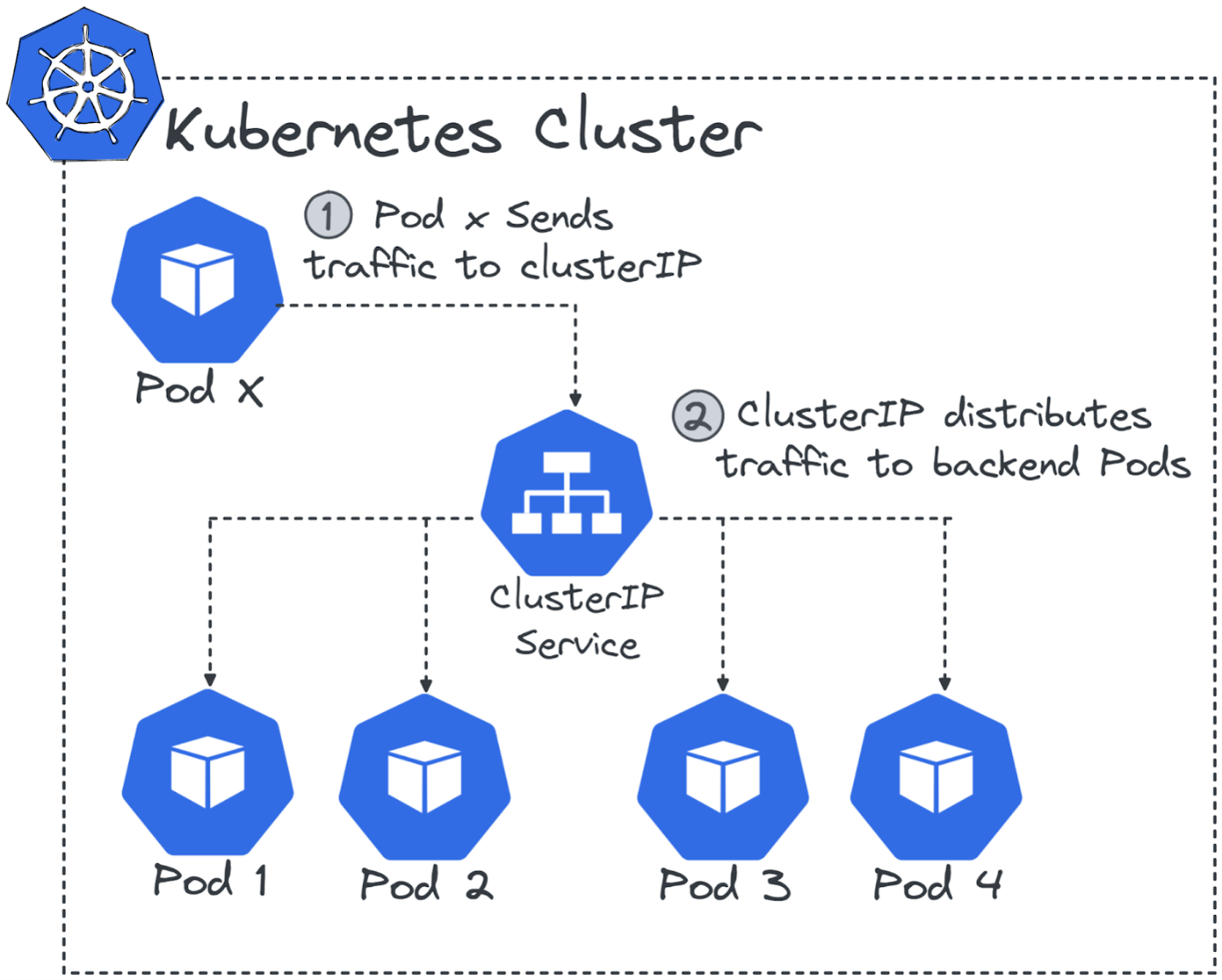
For HTTP-aware routing, use Ingress -- it routes external HTTP/HTTPS traffic to different Services based on hostname and path rules. Requires an Ingress Controller (NGINX, Traefik, HAProxy).
The Gateway API is the modern replacement for Ingress -- role-oriented, modular, protocol-agnostic. Ingress is now feature-frozen. New clusters should prefer the Gateway API.
NetworkPolicy provides a cluster-wide firewall at OSI Layer 3/4. By default, all Pods can communicate freely. Applying a NetworkPolicy restricts this with explicit ingress/egress rules. Requires a CNI plugin that supports it (Calico, Cilium, Weave Net).
Volume & Storage Objects
Kubernetes introduces three storage objects:
PersistentVolume (PV) -- represents a piece of storage provisioned by an admin or dynamically. It abstracts the underlying storage technology (cloud disk, NFS, local disk).
PersistentVolumeClaim (PVC) -- a user's request for storage, similar to how a Pod requests CPU. Developers specify amount, access mode, and StorageClass.
StorageClass -- defines how dynamic volume provisioning works. Tells Kubernetes which type of storage to use and how to create it.
Dynamic provisioning flow:
1. Admin creates a StorageClass  (defines HOW to provision)
2. Dev creates a PVC             (requests storage using that class)
3. Kubernetes provisions a PV   (automatically, on demand)
4. Pod mounts the PVC           (uses the volume)
5. PVC deleted                  (PV handled per reclaim policy: Retain / Delete)
Access modes:
ReadWriteOnce (RWO)-- read-write by a single nodeReadOnlyMany (ROX)-- read-only by many nodesReadWriteMany (RWX)-- read-write by many nodes
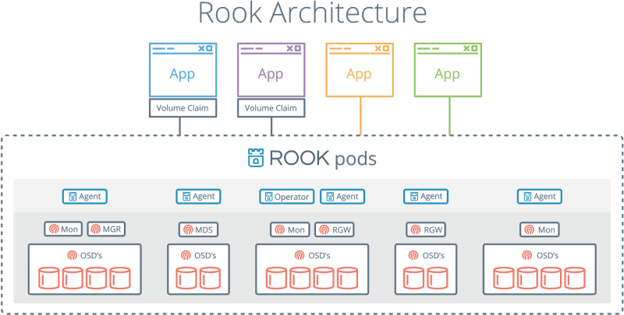
It is also possible to operate storage clusters directly in Kubernetes. Projects like Rook provide cloud native storage orchestration.
Projects like Rook integrate battle-tested storage solutions like Ceph directly into Kubernetes.
Configuration Objects
Embedding configuration in container images is bad practice -- any change requires rebuilding and redeploying. Instead:
ConfigMap -- stores key-value pairs or full config files independently of your Pods. Can be consumed as environment variables or mounted as files.
Secret -- stores sensitive values like passwords, API keys, credentials. Conceptually similar to ConfigMap but stored in base64-encoded format.
Important: base64 encoding is NOT a security mechanism. Secrets are not encrypted by default in etcd. In production, always integrate with: HashiCorp Vault, AWS Secrets Manager, or Google Secret Manager.
Autoscaling Objects
| Autoscaler | What it scales | Trigger |
|---|---|---|
| HPA (Horizontal Pod Autoscaler) | Number of Pod replicas | CPU/memory metrics |
| Cluster Autoscaler | Number of worker nodes | Unschedulable Pods |
| VPA (Vertical Pod Autoscaler) | CPU/memory per Pod | Resource utilization |
| KEDA | Pods + Jobs | Any event (queue depth, DB activity, etc.) |
HPA + Cluster Autoscaler work together: Pods scale first, nodes expand only when the cluster is full.
KEDA (launched 2019 by Microsoft and Red Hat) enables event-driven autoscaling. Scale based on Kafka queue depth, RabbitMQ messages, Azure Service Bus, or even the number of Pods in a cluster.
Kubernetes Security
Security in Kubernetes requires hardening the full stack: hardware, firmware, OS, container runtimes, and configuration layers. Security must begin at system design time, not after deployment.
Every API request passes through three stages:
Request -> Authentication -> Authorization (RBAC) -> Admission Control -> etcd
Authentication -- proves identity. Uses X.509 certificates or external identity systems. Kubernetes provides Service Accounts for workload authentication.
Authorization (RBAC) -- determines what the authenticated identity can do. Four RBAC building blocks:
| Object | Scope |
|---|---|
Role | Permissions in a specific namespace |
ClusterRole | Permissions across the entire cluster |
RoleBinding | Attaches a Role to users/groups/service accounts in a namespace |
ClusterRoleBinding | Grants cluster-wide permissions |
Best practice: principle of least privilege -- grant only the minimum permissions required.
Admission Control -- final stage before a request is accepted. Controllers can validate, modify, or reject requests. The Open Policy Agent (OPA) is a popular external admission policy engine.
Pod Security Standards (PSS):
| Level | What it enforces |
|---|---|
| Privileged | Fully permissive -- for trusted system services only |
| Baseline | Blocks host networking and privilege escalation |
| Restricted | Strictest -- non-root execution, limited capabilities, strict seccomp |
Chapter 5 -- Cloud Native Application Delivery
The Evolution
Early software ran directly on the machine where it was written, later distributed on physical media. Today, applications are committed to source repositories, automatically built into container images, and deployed directly to Kubernetes.
This shift is tied to the rise of the DevOps movement in the late 2000s -- a cultural transformation emphasizing collaboration, automation, and rapid iteration.
CI/CD
Continuous Integration (CI) -- automatically builds and tests code whenever changes are made. Multiple teams can work on the same codebase safely.
Continuous Delivery (CD) -- automates deployment of built artifacts. Deployments typically progress through development -> staging -> production.
Popular CI/CD tools: Spinnaker | GitLab | Jenkins | Jenkins X | Tekton CD | ArgoCD
GitOps
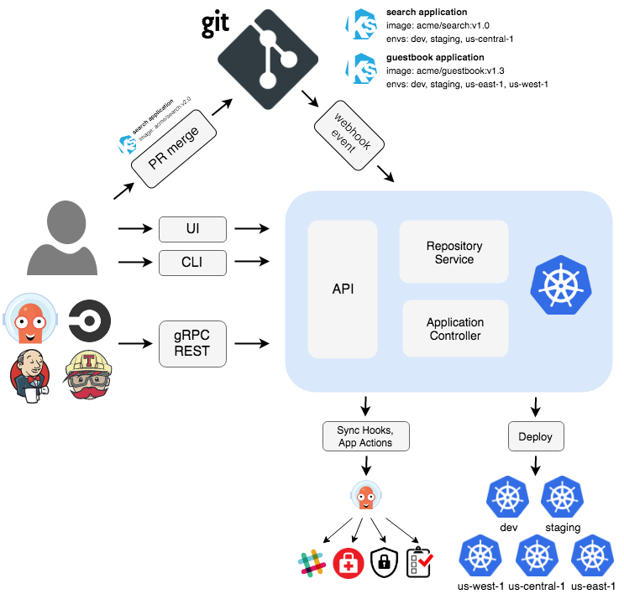
GitOps uses Git as the single source of truth for infrastructure and application state. All modifications flow through version-controlled operations -- commits, merges, and pull requests.
Two models:
Push-based -- a CI/CD pipeline applies changes directly to the platform on each commit.
Pull-based -- an agent inside the platform continuously monitors Git and applies changes when it detects drift between desired state (Git) and live state (cluster). Most modern GitOps platforms use this model.
Popular pull-based GitOps tools: Argo CD and Flux.
Kubernetes is particularly well-suited for GitOps since its API is designed for declarative provisioning. The etcd watch mechanism is essentially the same pull-based idea.
Argo CD
Argo CD is a GitOps-based Continuous Delivery tool built for Kubernetes. It automates deployment by using Git as the single source of truth. Whatever is in Git defines how your cluster should look.
Argo CD continuously monitors running applications and compares them with Git manifests. If it detects any difference ("drift"), it can automatically synchronize the cluster back to the desired state.
Key features:
- Support for Helm, Kustomize, Jsonnet, and plain YAML
- Multi-cluster deployment from one instance
- SSO integration (OIDC, SAML)
- Fine-grained RBAC for multi-team environments
- Rollback to previous Git commits
- Built-in health monitoring for Kubernetes resources
Chapter 6 -- Cloud Native Observability
Observability vs Monitoring
Observability is often used interchangeably with monitoring, but monitoring is only one component. The term encompasses much more.
The biggest challenge in microservices is understanding how hundreds of distributed components interact, how they behave under load, and how they respond when something goes wrong.
Observability answers questions like:
- Is the system stable?
- Why is a request failing?
- Where are bottlenecks forming?
- How sensitive is the system to increased latency?
Three Pillars of Telemetry
| Pillar | What it is | Tool |
|---|---|---|
| Logs | Messages recording events -- errors, warnings, debug | fluentd, filebeat -> OpenSearch, Loki |
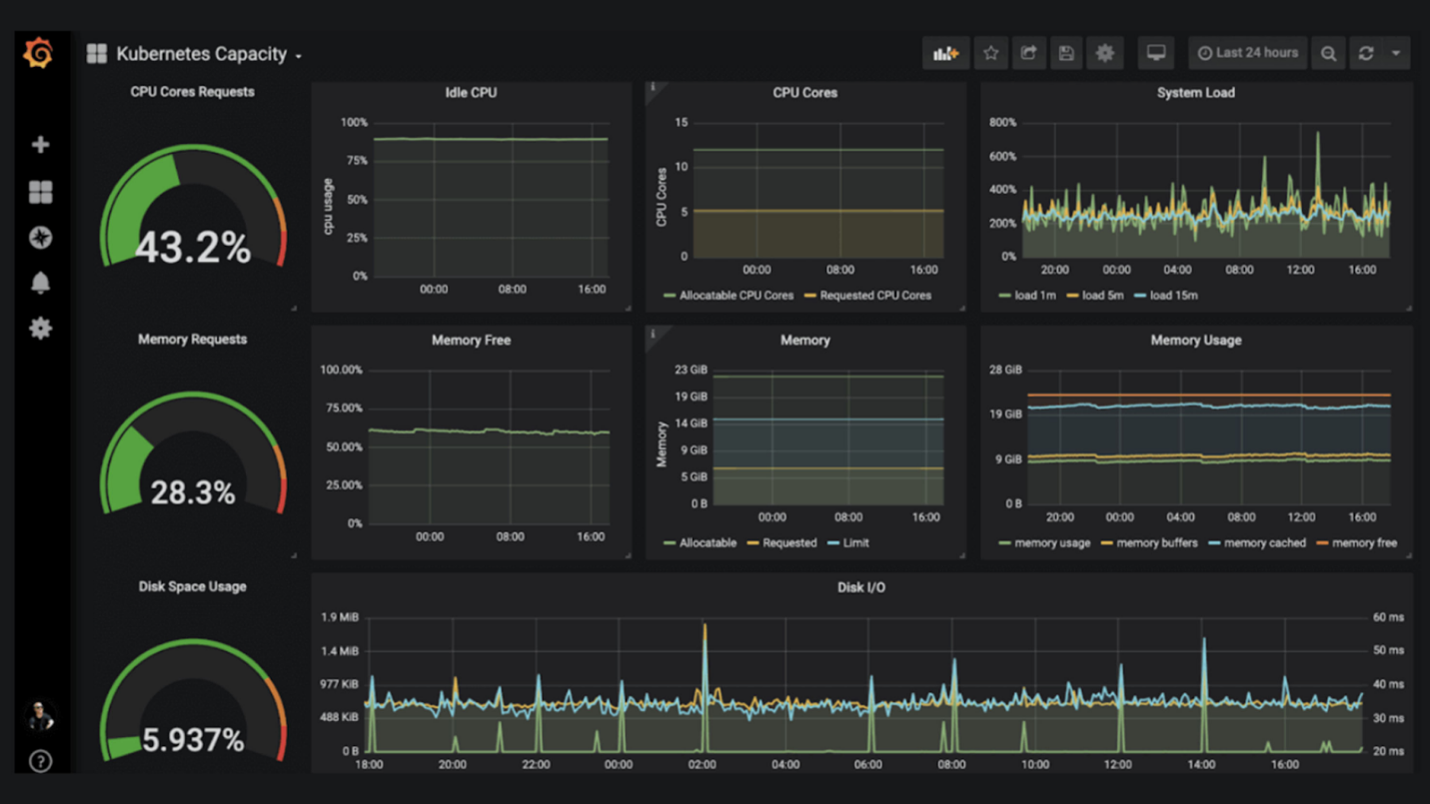
| Metrics | Quantitative measurements over time -- requests/sec, memory usage | Prometheus -> Grafana |
| Traces | Tracks a request's journey through distributed services | OpenTelemetry -> Jaeger |
Traditional systems stored logs locally -- admins had to SSH into individual machines. In modern systems with hundreds of services, this is impractical. All three pillars must be centralized.
OpenTelemetry
OpenTelemetry is an observability framework and toolkit that generates, collects, and exports telemetry data -- traces, metrics, and logs. It is open source, vendor-agnostic, and works with Jaeger, Prometheus, and commercial platforms.
Important: OpenTelemetry is NOT an observability backend. It provides the instrumentation and data pipeline that feeds those systems.
It was created by merging two earlier CNCF projects -- OpenTracing and OpenCensus -- into a unified, standardized solution.
Two core principles:
- You own the data you generate -- no vendor lock-in
- You only need to learn one set of APIs and conventions
Prometheus
Prometheus is an open source monitoring system developed at SoundCloud, adopted as the second CNCF-hosted project in 2016. It is the standard for metrics in the Kubernetes ecosystem.
Prometheus collects metrics as time-series data -- data points with a timestamp, optional labels, and a measured value.
Four metric types:
| Type | Description | Example |
|---|---|---|
| Counter | Only increases | Total requests, total errors |
| Gauge | Goes up or down | Memory usage, queue size |
| Histogram | Distribution in buckets | Request duration buckets |
| Summary | Histogram + quantiles | 95th percentile latency |
Applications expose metrics through an HTTP endpoint at /metrics. Prometheus scrapes these endpoints on a schedule and stores them in its time-series database.
PromQL -- Prometheus Query Language:
# All requests for a specific job and handler
http_requests_total{job="apiserver", handler="/api/comments"}

# Per-second rate over the last 5 minutes
rate(http_requests_total[5m])

# Memory usage above 80%
container_memory_usage_bytes / container_spec_memory_limit_bytes > 0.8
Alertmanager evaluates alerting rules and routes alerts to Slack, email, PagerDuty, or custom webhooks.
Distributed Tracing
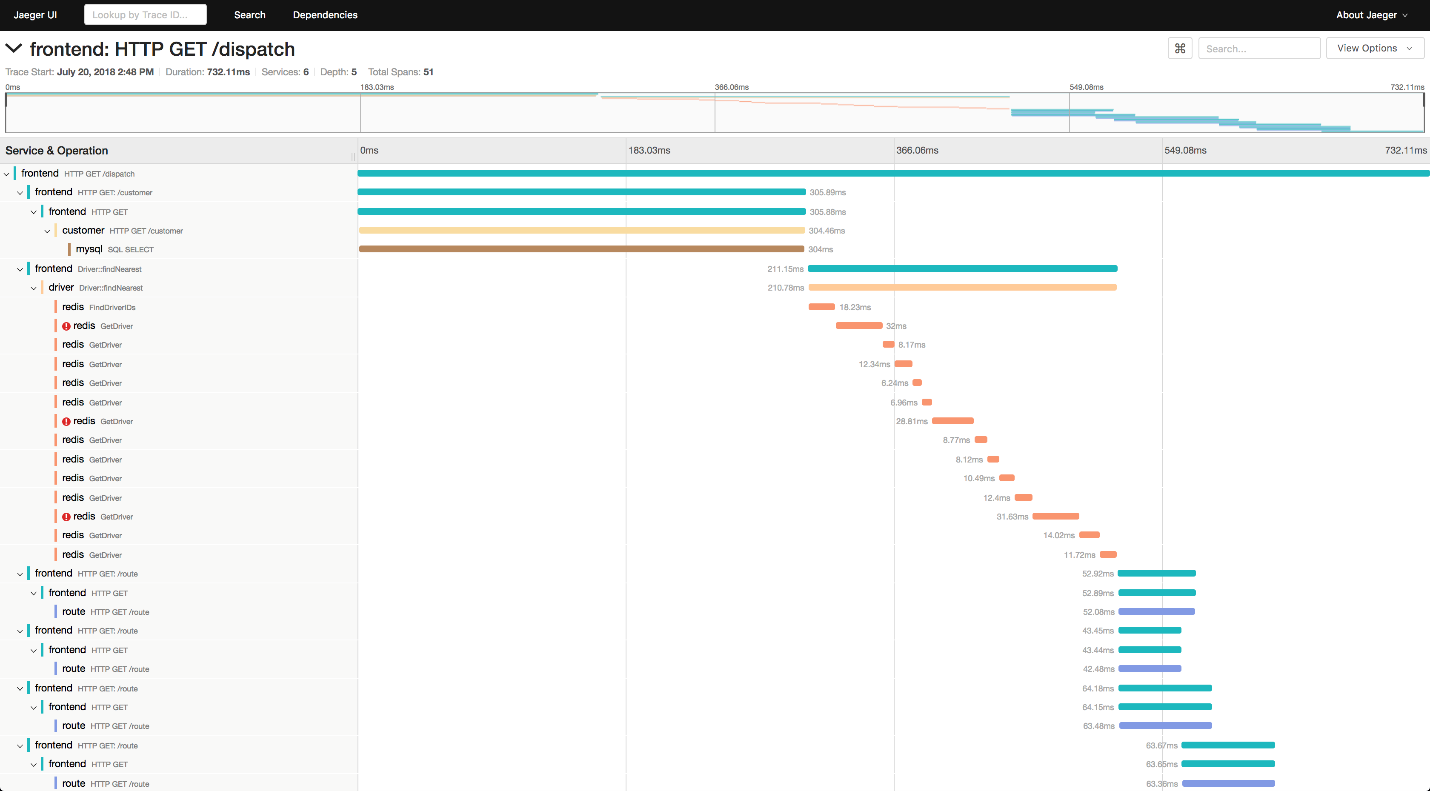
While logging and metrics give you insight into individual services, they fall short when understanding how a single request moves through an entire distributed system.
A trace records the lifecycle of a request across multiple services. It is composed of spans -- each representing a specific operation, with start/end times, operation name, and metadata.
Tools: OpenTelemetry (instrumentation) -> Jaeger (storage and visualization).
Cost Management
Key optimization strategies:
| Strategy | How it helps |
|---|---|
| Identify wasted resources | Monitoring reveals idle servers and underutilized capacity |
| Right-Sizing | Match instance size to actual measured usage over time |
| Reserved Instances | Commit to 1-3 years for up to 72% savings on predictable workloads |
| Spot Instances | Use excess cloud capacity for interruptible batch workloads (90% savings) |
OpenCost is a vendor-neutral, open source tool to measure and allocate costs for Kubernetes environments -- real-time cost monitoring and chargeback reporting broken down by Pod, namespace, label, and controller.
Quick Reference -- Things That Always Come Up
The Kubernetes Request Lifecycle
kubectl apply -f pod.yaml
       |
       v
kube-apiserver
  |- Authentication  (who are you?)
  |- Authorization   (what can you do? -- RBAC)
  +- Admission Control (does this comply with policies?)
       |
       v
    etcd  (desired state is stored)
       |
       v
kube-scheduler  (selects best worker node)
       |
       v
kubelet on worker node  (receives PodSpec)
       |
       v
container runtime  (pulls image, starts container)
Key Distinctions
| Comparison | Answer |
|---|---|
| Deployment vs StatefulSet | Deployment = stateless, pods are interchangeable. StatefulSet = stable pod identities, persistent storage |
| HPA vs VPA vs Cluster Autoscaler | HPA scales pod count. VPA scales pod resources. Cluster Autoscaler scales node count |
| ConfigMap vs Secret | ConfigMap = non-sensitive config. Secret = sensitive data (encoded, not encrypted by default) |
| Ingress vs Gateway API | Ingress = HTTP/HTTPS only, feature-frozen. Gateway API = modern, multi-protocol, actively developed |
| PV vs PVC vs StorageClass | PV = the actual storage. PVC = the request. StorageClass = how to provision dynamically |
| Liveness vs Readiness Probe | Liveness = restart if unhealthy. Readiness = stop sending traffic if not ready |
| CronJob vs Job | Job = run once to completion. CronJob = run on a schedule |
| Push-based vs Pull-based GitOps | Push = pipeline applies changes. Pull = agent continuously reconciles from Git |
Common Mistakes
- Setting CPU limits too low -- causes CPU throttling, not OOM kills
- Missing
readinessProbe-- traffic sent to pods before they're ready - Storing state in containers -- data lost on restart without PersistentVolumes
- Using
latestimage tag -- breaks reproducibility and rollback - Running containers as root -- always set
runAsNonRoot: true - Storing raw Secrets in Git -- use Vault or Sealed Secrets instead
- Using
cluster-adminfor application service accounts -- violates least privilege - Treating base64 in Secrets as encryption -- it is not
Interview Questions
Q: What is the difference between a container and a Pod?
A container is the isolated process running on Linux namespaces and cgroups. A Pod is the smallest deployable unit in Kubernetes -- it wraps one or more containers that share network and storage. Kubernetes never manages containers directly, only Pods.
Q: How does Kubernetes self-healing work?
The kube-controller-manager runs continuous control loops. If a Deployment specifies 3 replicas but only 2 are running, the ReplicaSet controller creates a new Pod. Liveness probes trigger container restarts. Node failures cause the scheduler to reschedule Pods elsewhere.
Q: What is etcd and why does it matter?
etcd is the distributed key-value store that holds all cluster state -- Pod specs, service definitions, secrets, node status. It is the single source of truth. If etcd is lost, the cluster state is lost. It must be backed up regularly and deployed on fast SSD storage.
Q: What happens when you run kubectl apply -f deployment.yaml?
The request goes to the kube-apiserver, which authenticates, authorizes, and runs admission controllers. The desired state is written to etcd. The kube-scheduler assigns Pods to nodes. The kubelet on each selected node pulls the image and starts the containers.
Q: What is the difference between a Service and an Ingress?
A Service exposes Pods as a stable network endpoint inside the cluster (ClusterIP) or outside via NodePort/LoadBalancer. An Ingress is an HTTP router that routes external traffic to different Services based on hostname and path rules. Ingress requires an Ingress Controller to function.
Q: What is GitOps and how is it different from traditional CI/CD?
GitOps uses Git as the single source of truth. Traditional CI/CD pipelines push changes on events. Pull-based GitOps has an agent inside the cluster continuously reconciling the live state with what is in Git -- any manual drift is automatically corrected.
Q: Why are StatefulSets needed? Can't Deployments handle databases?
Deployments treat Pods as interchangeable -- any Pod can be replaced with a fresh one. Databases need stable identities (db-0 is always the primary, db-1 is always the replica) and persistent storage tied to a specific Pod. StatefulSets provide this: stable hostnames, ordered deployment, and PVCs that survive Pod rescheduling.
My Preparation Strategy
Course: Linux Foundation LFS250 -- Kubernetes and Cloud Native Essentials
Format: Self-paced, 7 chapters
What worked for me:
- Reading with intent -- for every concept I asked "why does this exist?" before memorizing what it is. The architecture makes sense once you understand the problem it solves.
- Drawing the architecture from memory -- Control plane: etcd, apiserver, scheduler, controller manager. Worker: kubelet, kube-proxy, runtime. Drawing this repeatedly made it stick.
- Building the mental model in layers -- Cloud native principles -> Containers -> Orchestration -> Kubernetes objects -> Delivery -> Observability. Each layer depends on the one before it.
- Writing this document -- converting the course into my own words is the most effective study technique I've found.
Hardest concepts to grasp:
- The distinction between
etcd,kube-apiserver, andkube-scheduler-- they all sound like "the brain" until you understand each has one specific, narrow job. - StatefulSets -- why stable identities matter only clicks when you think about a database cluster where
pod-0is always the primary. - GitOps pull vs push -- why pull-based is superior: the cluster self-corrects against Git, so manual changes are automatically reverted.
What I'd tell my past self: Start with the why behind cloud native. Once you understand that scale breaks monoliths, every concept -- microservices, containers, Kubernetes, service meshes, observability -- makes intuitive sense. Don't memorize the what until you understand the why.
Cheat Sheet
# Cluster Architecture
Control plane: kube-apiserver | etcd | kube-scheduler | kube-controller-manager
Worker nodes:  kubelet | kube-proxy | container runtime (containerd)

# Workload Controllers
Deployment     -> stateless apps, rolling updates, rollbacks
StatefulSet    -> databases, stable identity + persistent storage
DaemonSet      -> runs on every node (logging, monitoring, networking)
Job            -> one-time task to completion
CronJob        -> recurring scheduled tasks

# Networking
ClusterIP      -> internal only (default)
NodePort       -> external via node IP + port (30000-32767)
LoadBalancer   -> cloud load balancer
Ingress        -> HTTP routing rules (use Gateway API for new clusters)
NetworkPolicy  -> pod-level firewall (Layer 3/4)

# Storage
PV -> PVC -> StorageClass (dynamic provisioning)
Access modes: RWO (one node) | ROX (many read) | RWX (many read-write)

# Configuration
ConfigMap -> non-sensitive config (env vars or mounted files)
Secret    -> sensitive data (base64, NOT encrypted -- use Vault in prod)

# Autoscaling
HPA     -> scales pod count (CPU/memory)
VPA     -> scales pod resources
KEDA    -> event-driven scaling
CAS     -> scales node count

# Security Flow
Request -> Authentication -> RBAC Authorization -> Admission Control -> etcd

# Observability Stack
Metrics -> Prometheus (/metrics) -> Grafana (dashboards) -> Alertmanager
Logs    -> fluentd/filebeat -> OpenSearch / Grafana Loki
Traces  -> OpenTelemetry (instrument) -> Jaeger (visualize)

# GitOps
Push-based: CI/CD pipeline applies changes on commit
Pull-based: Agent reconciles cluster with Git continuously (Argo CD | Flux)

# CNCF Maturity
Sandbox -> Incubating -> Graduated